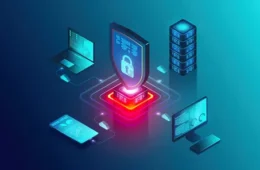
Cyber threats are increasing every day. Businesses and individuals face risks from malware, ransomware, and phishing attacks. Protecting devices is more important than ever. EDR (Endpoint Detection and Response) is a smart solution for this. Xcitium provides advanced EDR tools that keep endpoints safe. This guide explains everything about EDR cyber security in a simple, easy way.
What is EDR Cyber Security?
Understanding Endpoints
Endpoints are devices like:
- Computers
- Laptops
- Smartphones
- Servers
These devices connect to networks and store important data. If they are not secure, hackers can easily access information.
Role of EDR
EDR stands for Endpoint Detection and Response. It:
- Monitors devices in real-time
- Detects suspicious activity
- Responds to threats quickly
- Prevents malware and cyber attacks
Think of EDR as a security guard that watches every device in your network. It not only detects threats but also responds before serious damage occurs.
Why EDR is Important Today
Cyber attacks are becoming smarter. Traditional antivirus programs may not stop advanced threats. EDR adds another layer of security. It helps businesses:
- Protect sensitive data
- Meet compliance rules
- Reduce downtime after attacks
- Avoid financial loss
The EDR cyber security with Xcitium solution is designed to cover all these needs.
Key Features of Xcitium EDR
Real-Time Threat Detection
Xcitium constantly scans devices. It identifies:
- Malware
- Suspicious programs
- Unauthorized access
Real-time detection ensures threats are handled immediately.
Automated Response
EDR not only finds threats but also reacts. Xcitium can:
- Isolate infected devices
- Remove harmful files
- Alert security teams
This fast response reduces the damage and keeps networks running smoothly.
Threat Intelligence
Xcitium uses global threat intelligence. This means it learns from attacks happening worldwide. It can:
- Recognize new malware
- Predict attack patterns
- Provide updates automatically
With this, devices are always protected against the latest threats.
How Xcitium EDR Works
Data Collection
Xcitium collects data from endpoints. This includes:
- Running processes
- File activity
- Network connections
Collecting this information helps detect unusual behavior.
Analysis and Detection
Advanced algorithms analyze the data. They look for:
- Unusual logins
- Suspicious software behavior
- Potential malware
When something is detected, EDR marks it as a threat.
Response and Remediation
Once a threat is detected, EDR responds. It can:
- Quarantine files
- Stop harmful processes
- Notify IT teams
This ensures the threat does not spread.
Benefits of EDR Cyber Security with Xcitium
Strong Protection
EDR gives better protection than standard antivirus. Xcitium can stop advanced malware and ransomware attacks.
Easy Management
Xcitium has a simple dashboard. IT teams can:
- Monitor all devices
- See alerts in one place
- Manage security policies
This reduces complexity and saves time.
Compliance and Reporting
Many businesses must meet compliance standards. Xcitium helps by:
- Logging security events
- Creating reports
- Showing proof of protection
This builds trust with clients and regulators.
Advanced Endpoint Protection Strategies
Layered Security Approach
EDR works best when combined with other security layers:
- Firewalls
- Antivirus programs
- Email filters
- Security awareness training
A layered approach makes attacks much harder to succeed.
Regular Updates
Threats change constantly. Xcitium updates its software automatically. This ensures endpoints are always protected against new attacks.
Monitoring Remote Devices
Many employees work remotely. Xcitium can monitor devices outside the office. This is important because remote devices are often more vulnerable.
Real-World Use Cases
Small Businesses
Small businesses often have limited IT staff. Xcitium helps by:
- Automating threat detection
- Reducing the need for manual monitoring
- Preventing costly security incidents
Large Enterprises
Large enterprises have many devices. Xcitium scales easily and can protect hundreds or thousands of endpoints. It also provides:
- Centralized management
- Detailed reports for IT teams
- Fast response to multiple threats
Healthcare Industry
Hospitals and clinics handle sensitive patient data. EDR ensures:
- Patient data stays secure
- Devices remain operational
- Compliance with healthcare regulations
How to Implement Xcitium EDR
Step 1: Assess Needs
Determine how many devices and users you need to protect. Identify critical endpoints.
Step 2: Install Software
Xcitium provides installation guides. The process is simple and does not disrupt work.
Step 3: Configure Policies
Set security rules such as:
- File access controls
- Network restrictions
- Alerts for suspicious activity
Step 4: Continuous Monitoring
Once EDR is set up, monitoring starts immediately. Alerts are sent for any suspicious activity.
Training and Support
Employee Training
Even the best EDR needs trained staff. Employees should learn:
- How to recognize phishing emails
- How to report suspicious activity
- Importance of updates and strong passwords
Xcitium Support
Xcitium offers 24/7 support. IT teams can get help with:
- Installation
- Configuration
- Incident handling
This ensures smooth operation and trust in the system.
Common Challenges and Solutions
Challenge: Too Many Alerts
EDR may produce many alerts. Solution:
- Configure filters
- Focus on critical threats
- Use automation for minor alerts
Challenge: Remote Work Security
Remote devices may face weak networks. Solution:
- Enforce VPN use
- Monitor all endpoints with Xcitium
- Apply consistent security policies
Challenge: Integration with Existing Systems
Sometimes EDR must work with other software. Solution:
- Test in a small group first
- Ensure compatibility
- Gradually roll out to all devices
Monitoring and Reporting
Dashboards
Xcitium provides a clear dashboard with:
- Real-time alerts
- Device status
- Threat summaries
Reports
Reports can be generated for:
- Management
- Compliance
- Security audits
These help make informed decisions.
Future of EDR Cyber Security
Cyber threats are constantly evolving. Future trends include:
- AI-based threat detection
- Better automation
- Integration with cloud security
- More focus on remote work protection
Xcitium continues to innovate to meet these needs.
Why Choose Xcitium for EDR?
- Advanced threat detection and response
- Real-time monitoring
- Automated threat handling
- Global threat intelligence
- Easy deployment and management
- Strong support and updates
Businesses using Xcitium experience fewer attacks and faster recovery. This builds authority and trust in their security systems.
Best Practices for Endpoint Security
Keep Software Updated
Always install updates for:
- Operating systems
- Applications
- Security software
Updates fix vulnerabilities that hackers exploit.
Use Strong Passwords
Passwords should be:
- Unique for each device
- Hard to guess
- Changed regularly
Educate Employees
Employees should know:
- How to spot phishing emails
- How to avoid suspicious downloads
- Importance of secure networks
Backup Important Data
Even with EDR, backups are essential. Regular backups ensure business continuity.
Conclusion
EDR cyber security withXcitium provides strong protection for modern businesses. It monitors devices, detects threats, and responds quickly. Its advanced features, global threat intelligence, and easy management make it a trusted solution. Implementing Xcitium EDR helps businesses reduce risks, meet compliance requirements, and protect sensitive data.
EDR is not just for large enterprises. Small businesses and remote teams also benefit. With proper setup, training, and monitoring, Xcitium keeps endpoints secure and operations running smoothly.
FAQs
1. What is EDR in simple terms?
EDR is a security system that watches your devices and stops cyber threats.
2. Can small businesses use Xcitium EDR?
Yes. It is easy to manage and works for businesses of all sizes.
3. Does Xcitium update automatically?
Yes. It updates software to protect against new threats.
4. Can remote employees be protected?
Yes. Xcitium monitors remote devices the same as office devices.
5. Do employees need training to use EDR?
Yes. Training helps them recognize risks and follow security rules.